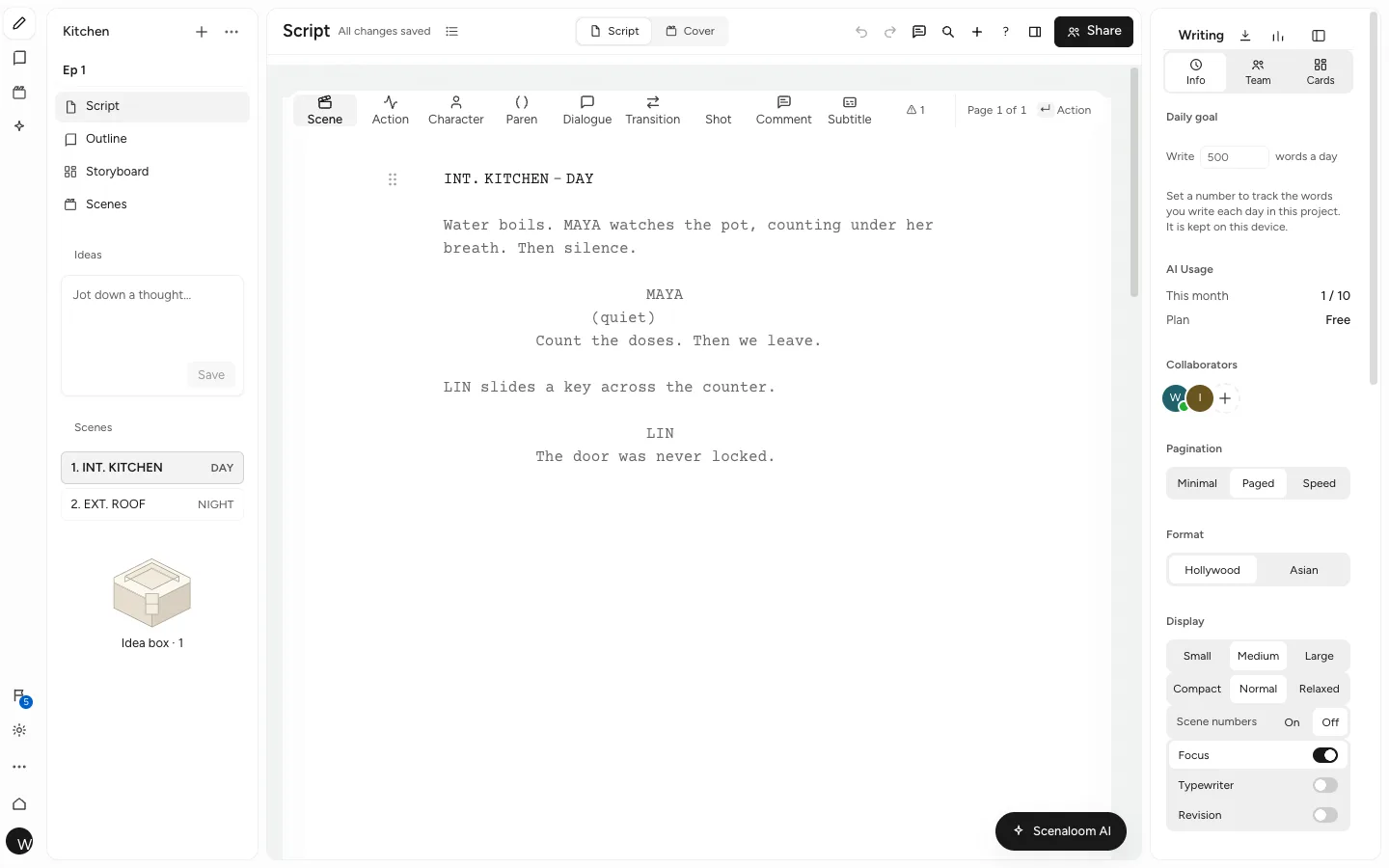
Scenaloom's screenplay editor is a browser-based script editor that applies screenplay format as you type. Every line is a typed element, so margins, capitals and page breaks follow the element rather than your tab key, and the PDF you export matches the page you wrote on.
Screenplay format software, element by element
You get a page where each line knows what it is. The editor has scene heading, action, character, parenthetical, dialogue, transition, shot, subtitle and comment elements, plus dual dialogue for two characters speaking at once.
The keys follow desktop screenwriting habits. Enter moves to the element that usually comes next: a scene heading leads to action, a character cue to dialogue, dialogue back to action and a transition to a new scene heading. Tab on an empty line cycles through action, character, transition and scene heading, and switches between dialogue and parenthetical. Mod+1 to 7 picks an element directly.
- Type a character's name in capitals on an action line and it becomes a cue.
- Type "(" on an empty speech line to start a parenthetical.
- The full key map is in formatting screenplay text.
Pages that match the PDF
What you see is what you send. The editor page and the PDF export share one layout engine, so page 37 in the editor is page 37 in the file you hand a producer.
Pages are US Letter in Courier Prime 12 pt — ten characters and six lines to the inch, 55 lines a page. Text starts 1.5 inches from the left edge with 1 inch on the right and top, and page numbers appear top right from page 2. Scene headings, action and shots run the full 60-character width; character cues sit 22 characters in; dialogue runs from 10 to 45 and parentheticals from 16 to 40. Transitions align right. Because the layout is the conventional one, a page still runs roughly a minute of screen time.
Automatic (MORE) and (CONT'D)
You never type a continuation mark. When a speech breaks across pages, the editor adds (MORE) at the foot of the page and NAME (CONT'D) at the top of the next, keeping at least two lines on either side of the split. When the same character speaks again after action in the same scene, the cue gets (CONT'D) on its own:
INT. LAUNDROMAT - NIGHT

Dryers turn. PRIYA (30s) folds a shirt that is not hers.

PRIYA
Somebody left this in number six.

She holds it up. A name tag is still pinned to the pocket.

PRIYA (CONT'D)
And they work at the bank across the street.
Page breaks follow the same conventions: scene headings, shots and cues stay with what follows them, and a transition never opens a page.
Hollywood and Asian layouts
You can write in the layout your script will be read in. Hollywood is the US layout described above. Asian is tuned for Chinese, Japanese and Korean scripts, and the interface itself runs in English, 简体中文, 繁體中文, Español, Français, Deutsch, 日本語 and 한국어.
Minimal, paged and speed pagination
You choose how much page you want to see while you draft. Minimal skips drawn page breaks for fast first drafts, Paged shows real pages when length matters, and Speed keeps very long scripts responsive. Display size, line spacing (compact, normal or relaxed) and scene numbers are separate switches, described in display and pagination.
Formatting check, revisions and focus
You get a short list of real slips, not a wall of warnings. The formatting check flags a cue with no dialogue, dialogue with no cue, an empty scene heading and one character spelled two ways, and each item links to its line.
- Focus and Typewriter modes for drafting with less on screen.
- Revision mode, with revision marks that carry into the PDF.
- Scene number locking (5A, 5B, OMITTED) and page locking (12A, 12B) once a script is in production.
- A title page with title, subtitle, Written by, author, edition, contact and draft line.
- Find and replace, bold, italic and underline, comments on lines and a daily word goal in the format bar.
Import and export FDX, Fountain and PDF
You can bring a script in and take it out without retyping. Scenaloom imports Final Draft (.fdx), Fountain (.fountain, .spmd) and PDF files, or you can paste a script into the New page.
Exports include PDF, Final Draft (.fdx), Fountain, Word (.docx), plain text and Markdown. FDX round-trips with bold, italic and underline kept, so a script can move between Scenaloom and Final Draft as a project needs. Every option is listed in import and export.
The editor is on every plan, including Free. Start a script in your browser — there is nothing to install.
Questions
Does Scenaloom format a screenplay automatically?
Yes. Scenaloom formats each line by its element — scene heading, action, character, parenthetical, dialogue, transition or shot — so indents, capitals and spacing are applied as you type. Enter and Tab move between elements the way desktop screenwriting software does, and (MORE) and (CONT'D) are added at page breaks without you typing them.
What font and page size does the editor use?
The Scenaloom editor uses Courier Prime 12 pt on US Letter pages, 55 lines a page, with text 1.5 inches from the left edge and 1 inch on the right and top. Page numbers sit top right from page 2. These are the conventional screenplay settings, which is why a page runs roughly a minute of screen time.
Will my PDF look the same as the editor?
Yes. The editor page and the PDF export use one layout engine, so the page breaks, (MORE) and (CONT'D) marks and page numbers you see while writing are the ones in the file. Optional extras such as a title page, scene numbers and revision marks are chosen when you export.
Can I import a Final Draft or Fountain file?
Yes. Scenaloom imports Final Draft (.fdx), Fountain (.fountain, .spmd) and PDF scripts, and you can paste a script into the New page. Word (.docx) is available as an export, along with PDF, FDX, Fountain, plain text and Markdown. FDX round-trips with bold, italic and underline kept.
Can I write a script in Chinese, Japanese or Korean?
Yes. Besides the Hollywood layout, Scenaloom has an Asian layout tuned for Chinese, Japanese and Korean scripts. The interface is also available in 中文, 日本語 and 한국어, as well as English, Español, Français and Deutsch, so a writer and a co-writer can each use the interface in their own language while working on the same script.