Scenaloom is collaborative screenwriting software: co-writers edit the same script at the same moment in a browser, see who is in the project and leave comments on the exact lines they mean. Collaboration is included on every plan, including Free.
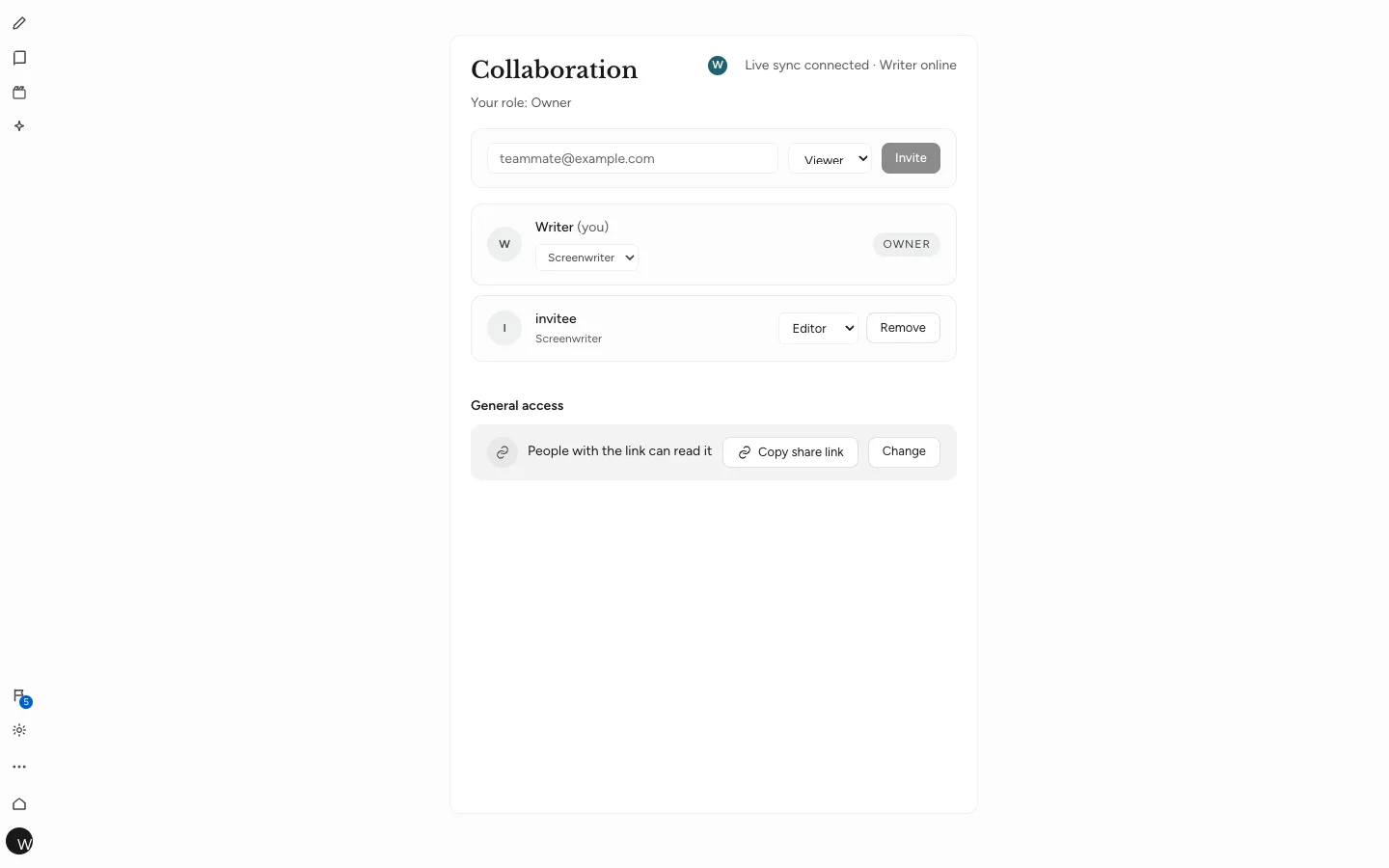
Write in the same draft at the same moment
You and your co-writer work in one script, not two copies that need merging. Edits appear for everyone as they are made, and live presence shows who is in the project.
Because scenes, characters and boards are read from the draft, a scene your partner writes shows up on your scene board too. There is one version of the story, and everyone is looking at it.
Roles and permissions
You decide who can do what. Every project member has a role: owner, admin, editor or viewer. Owners and admins manage access, editors write and comment, viewers read. A producer who only needs to read gets the viewer role and cannot change a line by accident. Members can also carry a craft, such as Screenwriter, so the team knows who does what.
Invite people by email from the project. Each role is described in sharing and roles.
Comments on lines, with replies and @mentions
You get notes attached to the line they are about, not a list in an email. Comment on any line, add an image if a reference helps, reply in a thread and @mention a collaborator to bring them in.
For partners in different time zones this replaces the long notes email: one writer leaves a question on a line at the end of their day, and the other finds it, and answers it, on the same line the next morning.
Version history you can preview and restore
You can always get back to an earlier draft. Save named versions at the moments that matter — the table-read draft, the network draft — preview any version and restore it when you need to. Changes applied from Scenaloom AI are recorded there too. A useful habit is to name versions after who received them, such as "Producer draft, March 3", so restoring later is a choice between labeled drafts rather than timestamps. See comments and version history.
Share links and public read-only pages
You can show the work without handing over the keys. A share link can be set so people with the link can read, so they can make changes or so anyone on the web can view. Nothing is shared until you create a link or publish. You can also publish a public read-only script page, or publish to the Scenaloom community when the script is ready for readers.
Running a writers' room in the browser
A remote writers' room needs one draft, clear permissions and a record of decisions. A practical setup in Scenaloom looks like this:
- Create the project, invite writers as editors and invite anyone who only needs to read as a viewer.
- Break the story together on the beat board and scene board.
- Hand out scenes in comments, with an @mention for each writer.
- Save a named version before each big pass, so the room can go back.
- Send a read-only share link to anyone outside the room who needs to read the draft.
Every editor writes in the same layout, so the PDF the room exports is the page everyone saw while writing.
Collaborative screenwriting with nothing to install
A co-writer needs a browser and an invite. Scenaloom runs in current Chrome, Safari, Edge and Firefox on Mac, Windows, Linux and Chromebook, so a partner on a different computer opens the same project. There is no desktop app and no offline mode; everyone writes online. Start a shared project on the Free plan.
Questions
Can two people write the same screenplay at once?
Yes. In Scenaloom, co-writers edit the same script at the same moment, with live presence showing who is in the project. Edits appear for everyone as they are made, so there are no copies to merge and no question of whose file is current.
Is collaboration included on the Free plan?
Yes. Collaboration is included on Scenaloom's Free plan, which costs $0 and needs no card. You can invite co-writers by email, assign roles, comment on lines and use version history without upgrading. Paid plans add more AI usage and generation credits when you need them.
Can I share a script without letting people edit it?
Yes. Give someone the viewer role, or create a share link set so people with the link can read. You can also publish a public read-only script page that anyone on the web can view, and change or remove access later.
Can I undo a co-writer's changes?
Yes. Scenaloom keeps version history with named versions, so you can preview an earlier version and restore it. Saving a named version before a big rewrite pass gives the whole team a clear point to return to. Changes applied from Scenaloom AI are recorded in the same history.
Do my co-writers need to install anything?
No. Scenaloom runs in the browser — current Chrome, Safari, Edge and Firefox on Mac, Windows, Linux and Chromebook — so co-writers only need an invite. There is no desktop app and no offline mode, so everyone needs an internet connection to write.