Scenaloom is free online screenwriting software: open it in a browser, start a script and every line takes standard screenplay format as you type. There is nothing to install and the Free plan needs no card. The PDF you export matches the page you wrote on.
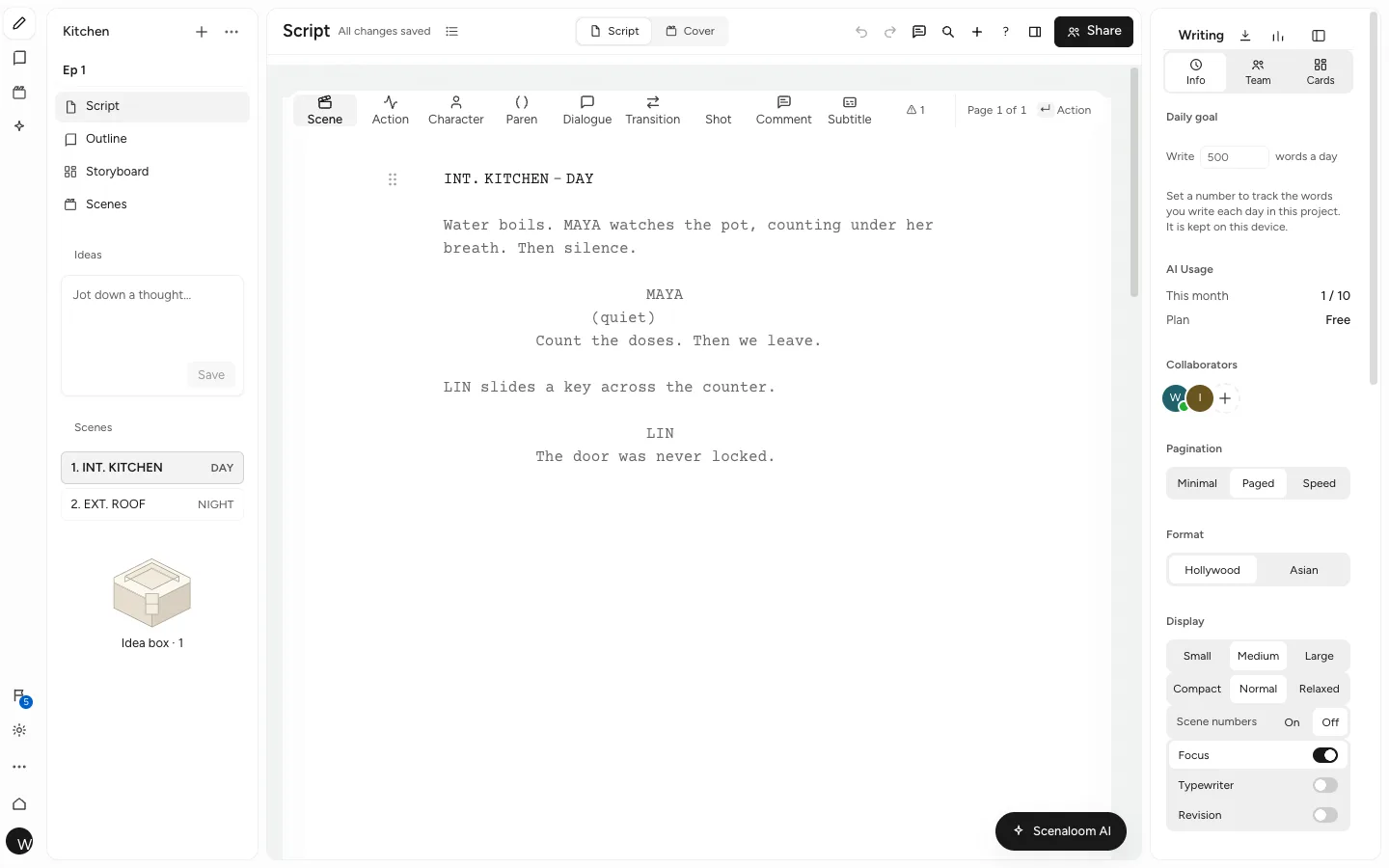
It suits a first short, a feature on its fifth draft or a pilot with three co-writers. Here is what it is like to write a screenplay online with Scenaloom, what it runs on and where its limits are.
Write a screenplay online in five steps
Writing a screenplay online in Scenaloom takes a browser and a few keystrokes:
- Open a new project and choose a screenplay.
- Type a scene heading such as INT. BUS DEPOT - NIGHT and press Enter. The next line is action.
- Type a character's name in capitals on its own line and press Enter. The next line is dialogue; Enter again returns to action.
- Keep going. Press Tab on an empty line to switch between action, character, transition and scene heading.
- Export a PDF, or send a share link to a reader.
This is what those keystrokes produce:
INT. BUS DEPOT - NIGHT

One bench. One buzzing light. MARGO (60s) feeds coins into a vending machine that has already eaten three.

MARGO
(to the machine)
I know you can hear me.

A can drops. She looks at it, then at the empty depot.

MARGO (CONT'D)
Thank you.

TEO (O.S.)
Does it do that for everyone?

CUT TO:
In the editor this sits on a real page: Courier Prime 12 pt, character cues indented, dialogue in its narrower column and the transition against the right margin. The (CONT'D) on Margo's second cue was added by the editor because she spoke again after action in the same scene — nobody typed it.
Screenwriting software for Mac, Windows, Linux and Chromebook
Scenaloom runs in current Chrome, Safari, Edge and Firefox, so the same script writing website works as screenwriting software for Mac, Windows, Linux and Chromebook. Sign in on any of them and your projects are there. Phones and tablets work in the browser too, for reading a draft or fixing a line on the way to a meeting.
Two honest limits: there is no desktop app to download, and there is no offline mode. Scenaloom needs an internet connection to open and save your work. If you expect to be offline, export a PDF or a Fountain file first so you can still read the pages.
The interface is available in English, 简体中文, 繁體中文, Español, Français, Deutsch, 日本語 and 한국어.
A script maker that handles the formatting
You write; the page takes care of margins, capitals and breaks. Every line is a typed element — scene heading, action, character, parenthetical, dialogue, transition or shot — and each has its own place on the page.
- US Letter pages in Courier Prime 12 pt, 55 lines a page, with a 1.5-inch left margin.
- (MORE) and (CONT'D) added automatically when a speech crosses a page break.
- Scene headings and character cues are never left stranded at the foot of a page.
- A Hollywood layout and an Asian layout for Chinese, Japanese and Korean scripts.
- A formatting check that lists clear slips, such as a cue with no dialogue, each linked to its line.
The screenplay editor page goes through every rule. If you are new to the format itself, start with the screenplay format guide.
Bring a script you already have
You do not have to start over to switch. Scenaloom imports Final Draft (.fdx), Fountain (.fountain, .spmd) and PDF scripts, and you can paste a script straight into the New page. Characters, locations and scenes are then read from it like any script written here.
Word (.docx) is an export format, not an import one. To bring in a script written in Word, paste it into the New page or save it as a PDF first.
Export to PDF, FDX, Fountain and Word
You can take your work anywhere, with the formatting intact. Export a PDF with an optional title page, scene numbers, page numbers and revision marks. Export Final Draft (.fdx), which round-trips with bold, italic and underline kept, or Fountain, Word (.docx), plain text and Markdown.
Because the editor and the PDF share one layout engine, a page in the editor is a page in the PDF. The page count you watch while writing is the page count a reader sees — roughly a minute of screen time per page.
Write alone or with co-writers
You can invite a co-writer by email and write in the same draft at the same time, with live presence, comments on lines and version history you can restore. Collaboration is on the Free plan, and roles keep readers from editing. More on real-time collaboration.
An AI assistant, only when you ask
Scenaloom AI is there if you want a second pair of eyes — a tighter line, a more visual beat, notes from a Script Doctor — and it waits for you to apply any change. It does not edit your pages on its own, and every applied change is recorded in version history.
Plan and produce in the same project
When the draft needs a plan, the outline, beat board, scene board and story bible sit in the same project and read from the script. When it heads toward production, characters and locations are already listed from your cues and scene headings, and each scene can have a shot list and storyboard.
Start on the Free plan
The Free plan costs $0 and needs no card. It includes 2 screenplay, 2 film and 2 novel projects, script editing up to 400 lines per script, collaboration, 10 assistant chats and 10 writing cards a month. When a script outgrows it, Writer is $20 a month, with Pro, Studio and Studio Max above it, and yearly billing is 20% off. Compare every plan on the pricing page.
Questions
Is Scenaloom free?
Yes. Scenaloom has a Free plan at $0 with no card required. It includes 2 screenplay projects (plus 2 film and 2 novel projects), script editing up to 400 lines per script, collaboration, 10 assistant chats and 10 writing cards a month. Paid plans start at $20 a month with Writer.
Do I need to install anything?
No. Scenaloom is screenwriting software that runs in the browser — current Chrome, Safari, Edge and Firefox on Mac, Windows, Linux and Chromebook, and on phones and tablets. There is no desktop app to download; you sign in and your projects are there.
Can I import my Final Draft script?
Yes. Scenaloom imports Final Draft (.fdx) files, as well as Fountain (.fountain, .spmd) and PDF scripts, and you can paste a script into the New page. You can also export back to .fdx; bold, italic and underline survive the round trip.
Does Scenaloom work offline?
No. Scenaloom has no offline mode, so you need an internet connection to open and save your work. If you expect to be without a connection, export a PDF or Fountain file beforehand so you can still read your pages.
Can I co-write a screenplay with someone?
Yes. Invite a co-writer by email and you can both write in the same draft at the same moment, with live presence, comments with @mentions and version history you can restore. Collaboration is included on the Free plan, and roles let you add readers who cannot edit.
Will the PDF match what I see in the editor?
Yes. Scenaloom's editor and its PDF export share one layout engine, so page breaks, (MORE) and (CONT'D) marks and page numbers in the PDF are the ones you saw while writing. You choose extras such as a title page or scene numbers at export.